Why laser cutters and CNC machines want DXF
SVG is made for screens. It describes how a picture looks: fills, line widths, gradients, text in a font. A machine needs none of that. It needs the path the tool follows, at a real size.
DXF is the format CAD programs use for exactly that, and nearly every laser cutter, plasma table, CNC router and vinyl cutter reads it. Converting an SVG to DXF keeps the outlines and their size and drops the rest.
Getting the size right
Size is where SVG to DXF conversions go wrong, because an SVG can state its size in several ways and programs read them differently.
- Millimeters, centimeters or inches in the file. This is the reliable case. The DXF is that size.
- Pixels. A pixel has no fixed size. The web standard says 96 pixels to the inch, and that is what this converter uses. Illustrator writes sizes in points, 72 to the inch, and labels them pixels, so a 100 mm design from Illustrator arrives as 75 mm.
- No size at all. Some files give only a viewBox. Its numbers are read as pixels.
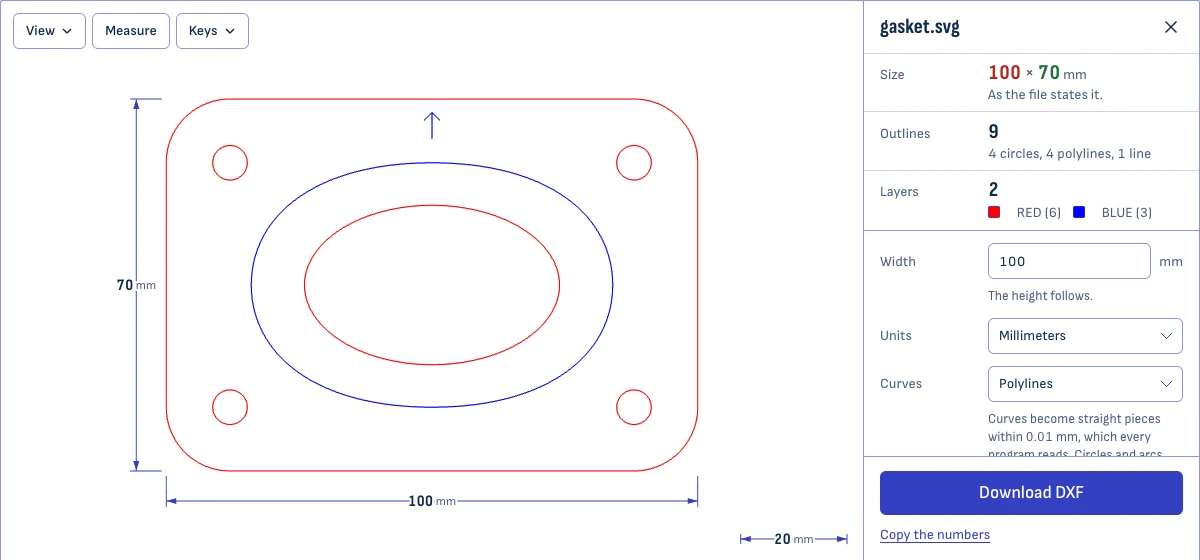
The page shows which of these your file was and the size that results. If it is not the size you drew, type the right width. Everything is scaled together, so proportions stay.
The outlines keep their place on the SVG’s page. The DXF’s origin is the bottom left corner of that page.
Curves: polylines or splines
A machine moves in straight lines and arcs. Circles and arcs of circles in your SVG stay true circles and arcs in the DXF, in every setting, so a round hole is cut as one smooth move.
Other curves are converted in one of two ways:
- Polylines. The curve becomes straight pieces, each within 0.01 mm of it. This is the safe choice: every program reads polylines, and at that tolerance the pieces cannot be seen or felt.
- Splines. The curve stays a curve, exactly as drawn. Good for carrying a design into CAD. Not available in R12, which has no splines.
What is not converted
A DXF made here holds outlines only. The page tells you when your file has any of these:
- Text is left out. Turn it into outlines first.
- Pictures placed in the SVG (PNG or JPG) are left out. To cut the shape of a picture, trace it with the PNG to DXF converter.
- Clipping paths and masks are not applied. A shape that is partly hidden in the SVG comes out whole.
- Fills and line widths have no meaning for a machine. A filled shape gives its outline; a thick line gives its center line; a dashed line gives a solid one.
Shapes that are hidden in the SVG stay out of the DXF.
Questions
Is my file uploaded?
No. The SVG is read and converted by your own browser. Nothing is sent to a server, so a design you are not free to share stays on your device.
Why does my DXF come in at the wrong size?
Check the Size shown here first: it is the size the DXF has. If it is right here and wrong in your laser or CAD program, that program is reading the numbers in another unit. A DXF 2000 file says which unit it uses, and most programs follow it. An R12 file cannot say, so tell the program the file is in millimeters, or choose Inches here if your machine works in inches.
If the size is already wrong here, the SVG itself states it wrong. Type the width the design should have and the height follows.
Should I choose polylines or splines?
Polylines, unless you know your program reads splines well. A polyline is a chain of short straight pieces that never strays more than 0.01 mm from the curve, which is finer than a laser beam or a router bit, and every program reads it. Splines keep the curves exactly and are lighter to edit in CAD, but some laser and CNC programs skip them or draw them roughly.
What happens to text?
It is left out, and the page tells you how many texts were. A DXF made here holds outlines, and the shapes of letters live in a font the next program may not have. Turn text into outlines before saving the SVG: in Inkscape, select it and choose Path, then Object to Path; in Illustrator, Type, then Create Outlines.
Do my colors survive?
Yes, as layers. Every stroke color gets a layer of its own, which is how laser software tells cutting from engraving. Pure red, green, blue, cyan, magenta, yellow and black get those names; any other color is named after its code, such as COLOR_FF8800, and given the nearest of AutoCAD's 255 colors.
Which DXF version should I pick?
DXF 2000 for almost everything: it is read by current laser, CNC and CAD programs and it records the unit. R12 is the oldest version still in use. Pick it when a program rejects the 2000 file or draws nothing.
Can I go the other way, from DXF to SVG?
Yes. Open the DXF in the DXF viewer on this site and save it as SVG. It keeps the drawing's real size and its layers.