How a picture becomes a drawing
A PNG or JPG is a grid of colored pixels. A laser cutter or CNC router cannot follow pixels: it needs outlines, the paths its tool moves along. Tracing finds them.
The converter looks at how dark each pixel is and draws the outline where dark turns to light. It places that line between pixels, by how dark each neighbor is, so a picture with soft, anti-aliased edges gives an outline that is true to a fraction of a pixel instead of one that climbs in steps.
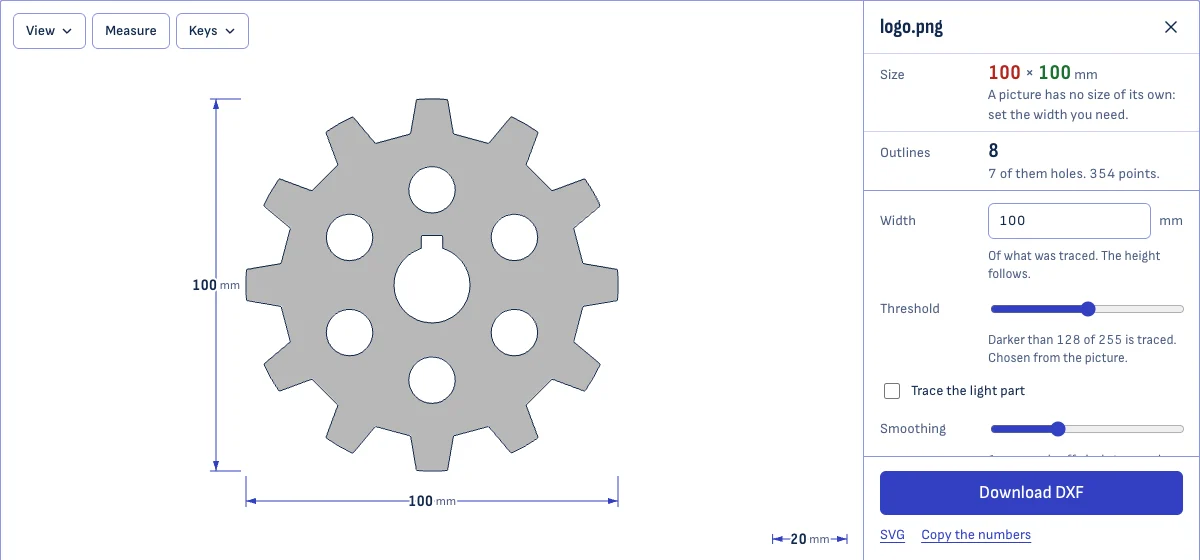
Every outline is closed. A shape with a hole in it, such as the letter O, gives two: the outside, and the hole. The DXF holds them as polylines, which every laser, CNC and CAD program reads.
Getting a clean trace
Open your picture and look at the result laid over it. Then adjust, in this order:
- Threshold. It decides how dark a pixel must be to count as part of the shape. It is chosen from the picture to begin with. Move it if thin parts vanish or the background creeps in.
- Trace the light part. A light logo on a dark background is spotted and traced as the logo. Tick or untick the box if the guess was wrong.
- Smoothing. More smoothing gives calmer curves and rounder corners. Less keeps sharp corners and shows pixel steps.
- Specks. Shapes smaller than this many pixels are left out: dust on a scan, noise in a JPG.
- Detail. Coarse writes fewer points, which some machines run more smoothly. Fine keeps every curve.
The picture stays visible under the outlines. Zoom in to check a detail, and use Measure to check a distance once the size is set.
Setting the size
A picture has no real size, so set one. Type the width the traced shape should have, in millimeters or inches, and the height follows. The two dimension lines on the result show what the DXF will measure.
If the picture records its resolution, as scans and exports from drawing programs often do, it opens at its true size: a 600 pixel wide scan at 300 pixels to the inch is 50.8 mm wide.
What tracing cannot do
- Photographs. A photo traces into a patchwork of blobs. A clear silhouette against a plain background can work; a face will not.
- Single lines. A drawn line becomes an outline around the line, not a path along its middle.
- Exact geometry. A traced circle is a many-sided polygon that follows the picture’s circle closely. It is not a true circle with a center and a radius. For parts that must fit, draw them in CAD.
- Very large pictures. A picture over 4,096 pixels on its long side is traced at that size. Nothing a machine could cut is lost.
Questions
Is my picture uploaded?
No. The picture is traced by your own browser. Nothing is sent to a server, so a logo or drawing you are not free to share stays on your device.
Which pictures trace well?
Flat shapes with clear edges: logos, icons, silhouettes, line drawings, scanned sketches in ink. The larger and sharper the picture, the better the outline: for a logo, 1,000 pixels across is a good start. Photographs, gradients and soft shadows trace badly, because they have no single edge to follow.
How do I get the DXF at the right size?
Type the width you need. A picture is a grid of pixels and has no size in millimeters, so the converter starts at 100 mm and you set the real one; the height follows. A scan or an export that records its resolution (300 pixels to the inch, say) opens at its true size instead.
Why does a thin line come out as two lines?
Because a line in a picture has a width, and tracing follows edges. A stroke two pixels wide has an edge on each side, so it becomes a long, narrow closed outline. That is right for cutting a shape out. For engraving along a single line, draw the line as a vector in a drawing program and use the SVG to DXF converter.
Why are the corners slightly rounded?
Smoothing. It blurs the picture a little before tracing, which removes pixel steps and JPEG noise and also takes the point off a sharp corner. Turn Smoothing down to keep corners sharp. At zero the outline follows the pixels exactly, steps included.
My JPG has specks and ragged edges. What helps?
Usually nothing is needed: the settings a picture opens with ignore shapes under 12 pixels and smooth by one pixel, which removes the noise JPEG compression leaves. For a rougher picture, raise Smoothing and Specks. If you can get the picture as a PNG, use that.
Can I trace a logo in several colors?
Yes. Set Colors to the number of colors in the picture, background included. Each color is traced onto a layer of its own, named after its color, so laser software can cut or engrave them separately. The color along the picture's edge is taken as the background and left out.
Should I use this if I have the logo as a vector file?
No. A vector file (SVG, PDF, AI, EPS) already holds the exact outlines, and tracing a picture of it can only come close. Save it as SVG and use the SVG to DXF converter.